Skip to content
monolab— home
The work

Warden

system-wide content blockerbeta

Warden filters at the machine's own resolver, so every browser and every program is covered by the same rules with nothing installed in any of them — then closes each way around that, one layer at a time.

Platform
Windows 10 & 11
Runs as
Windows service
Interface
desktop · full CLI
Categories
13
Account required
none
Telemetry
none

01

The problem

What you want kept off a machine does not arrive through one door. Some of it is a website; some of it was never a browser at all. Warden stands at the doors the machine itself owns — its resolver, its firewall, the policies browsers read, the programs and files Windows opens, the hours of the day — and then puts its own settings behind a delay, because that is the last way out.


02

Seven layers

Each layer exists because the one above it leaks. They are numbered because the order is the argument.

LayerThe way around the layer aboveWhat closes it
01— the starting pointFiltering at the machine's resolver
02The browser brings its own resolverBrowser policy, held in place
03Install a browser that ignores policyBrowsers that will not open
04Send DNS straight to a hardcoded addressWho may ask at all
05The ad inside a page you asked forFiltering inside the page
06It was never a browserPrograms, folders and files
07Open the settings and switch it offSettings that spend time

Layer 01The starting point

Every lookup on the machine goes through Warden

Warden runs a DNS resolver on the machine and points Windows at it. Browsers, apps and background updaters are all filtered by the same rules, and none of them need anything installed. It takes over system DNS only when you say so, keeps a snapshot of what was there before, and puts it back on request.

  • Thirteen categories. Ads, trackers, malware and scams, adult, gambling, social media, games, dating, shopping, food delivery, piracy, drugs and smart-TV telemetry — millions of domains, re-checked for new versions every few hours rather than once at install.

  • Encrypted upstreams. DNS-over-HTTPS, DNS-over-TLS or plain, from a catalog of public resolvers — including ones that filter adult content themselves — or an address of your own.

  • Your own rules. Block or allow specific domains, with patterns. An allow always wins. A rule that cannot work is shown to you, with the reason, instead of being quietly dropped.

  • Your own lists. Add any blocklist by URL or file, in hosts, domains or adblock format.

  • A pause that ends by itself. Suspend filtering for a set period. It is a deadline rather than a switch, because a pause somebody has to remember to end is an unprotected machine nobody notices.

Layer 02The browser brings its own resolver

Browser policy, and something to hold it in place

Chrome, Edge, Firefox and their relatives can run their own DNS over HTTPS. When they do, the machine's resolver never sees the lookup and every list on it becomes decoration. Warden turns that off by enterprise policy — and re-asserts the policy, because a policy written once is a policy something else can delete.

  • Browser DNS-over-HTTPS switched off. Per browser, by policy, and checked again rather than written once.

  • Private browsing removed. A private window was always filtered identically; what it defeated was the record, and for anyone using Warden against their own habit the record is half the point.

  • Proxy settings pinned. So a browser cannot send the connection and the name resolution somewhere Warden never sees.

  • Proxy-permission extensions blocked. The one permission every VPN and proxy extension needs.

  • Extensions you choose, force-installed. And not removable, in Chromium browsers and Firefox alike.

  • Reversible by design. The existing policy is snapshotted before anything is written, and restored when you turn the lockdown off.


Layer 03Install a browser that ignores policy

A browser Warden cannot police does not open

Every policy above reaches a browser through a registry key that the common browsers read. Installing one that does not read it takes a single download and no administrator rights, and on that machine the whole layer above is decoration. So the browsers Warden cannot filter are stopped from running.

  • A catalog of browsers that ignore policy. Tor Browser among them.

  • Identified by the file's own version information. So renaming the executable, or shipping a fork of it, does not walk past the check.

  • Running processes are swept. So one that was already open when the lock came on is caught too.

  • Exceptions by name. For somebody who needs a particular browser for work and accepts that Warden cannot filter it.

  • The block explains itself. Whoever launched it gets a panel naming the program and saying why it did not open, rather than a double-click that silently does nothing.


Layer 04Send DNS straight to a hardcoded address

Who may ask, not only what the answer is

A program can skip name resolution altogether and send DNS straight to an address it has built in. No hostname is involved anywhere in that, so no blocklist can reach it. This is the layer that closes it, and it is the one that needs the firewall rather than the resolver.

  • Plain DNS to anywhere but Warden, blocked. At the Windows firewall.

  • DNS-over-TLS and DNS-over-QUIC blocked with it. On port 853.

  • Known public DNS-over-HTTPS resolvers blocked by address. On 443 — the only thing that stops a browser pointed at a bare IP.

  • Allowances where a machine needs them. A corporate resolver, a domain controller, or private ranges when virtual machines resolve through a virtual adapter.

  • The Windows hosts file is baselined and watched. Entries added since are reported. Reverting them is a separate choice, because pointing a name at a development server is also what that file is for.


Layer 05The ad inside a page you asked for

The page closes up, instead of leaving a hole

Blocking an advertisement's domain stops it loading and does nothing about the space it was going to occupy. On a news site that is a black band a few hundred pixels tall, and from the reader's side that is not the ad being blocked, it is the page being broken. Closing that gap means changing the page, inside the browser, where the page is already decrypted.

  • Warden's own extension. Signed and installed by policy, carrying element-hiding rules compiled from the same lists — so the layout closes up instead of leaving the gap.

  • Extended CSS and site-specific rules. For the pages an ordinary selector cannot describe.

  • Scriptlets. For the advertisements a page builds with its own code rather than fetching.

  • Nothing in the network path. No proxy, no certificate authority, nothing that can take a machine off the internet.

  • An optional HTTPS content filter. For what even that cannot reach. It is off by default and it is the one setting that changes what Warden is: turning it on installs a certificate authority and decrypts traffic on this machine. The interface says exactly that, in those words, before you turn it on.


Layer 06It was never a browser

Programs, folders and files — not only sites

Some of what people want kept off a machine was never a website. A game, a chat client, a folder of downloads. Warden blocks those the way Windows itself understands them, and every block it applied can be lifted in one command.

  • Stop a program launching, or reaching the network, or both. Block means the program does not start.

  • Pick from what is installed, or from what is running now. Or type a name. Three ways to name a program, because a full path, a bare executable name and a publisher are each right in different cases.

  • Recovery tools take a separate confirmation. Blocking Command Prompt, PowerShell, Registry Editor or Task Manager is accepting that you may be removing the tools you would undo this with.

  • Deny a folder, or a single file. To standard users, or to everyone including administrators.


Layer 07Open the settings and switch it off

Settings that spend time, not permissions

Everything above is undone by opening the settings, which is why the settings are a layer of their own. Most protections here are friction an administrator can eventually take back. One is not: a delay cannot be granted around.

  • A password on the settings. Stored only as a hash, so the settings file never contains it.

  • A delay on anything that weakens protection. Turning a category off, adding an allow, giving up the DNS takeover. Tightening protection is never delayed. This is the measure that spends time rather than permissions, and the one an administrator cannot simply step around.

  • The service can be locked. Against being stopped or deleted from the Services window or the command line.

  • The uninstaller can ask for the same password. Set while installing.

  • Nothing happens quietly. Warden names what a pending change would loosen, and how long it will wait before taking effect.


03

Time, and what a search returns

Two controls that are not about blocking a destination at all.

01

Safe search, forced

Filtered results on the major search engines, applied at the resolver so it holds in every browser. YouTube's restricted mode is its own separate setting, at moderate or strict, because plenty of people want one without the other.

02

Schedules, per category

Block a category inside a window, or allow it only inside one. Per weekday, and windows may cross midnight — so no games after ten is a rule the machine keeps, not something anybody has to remember to switch on at ten.


04

What it shows you

A blocker that cannot tell you whether it is working is asking to be trusted on its word.

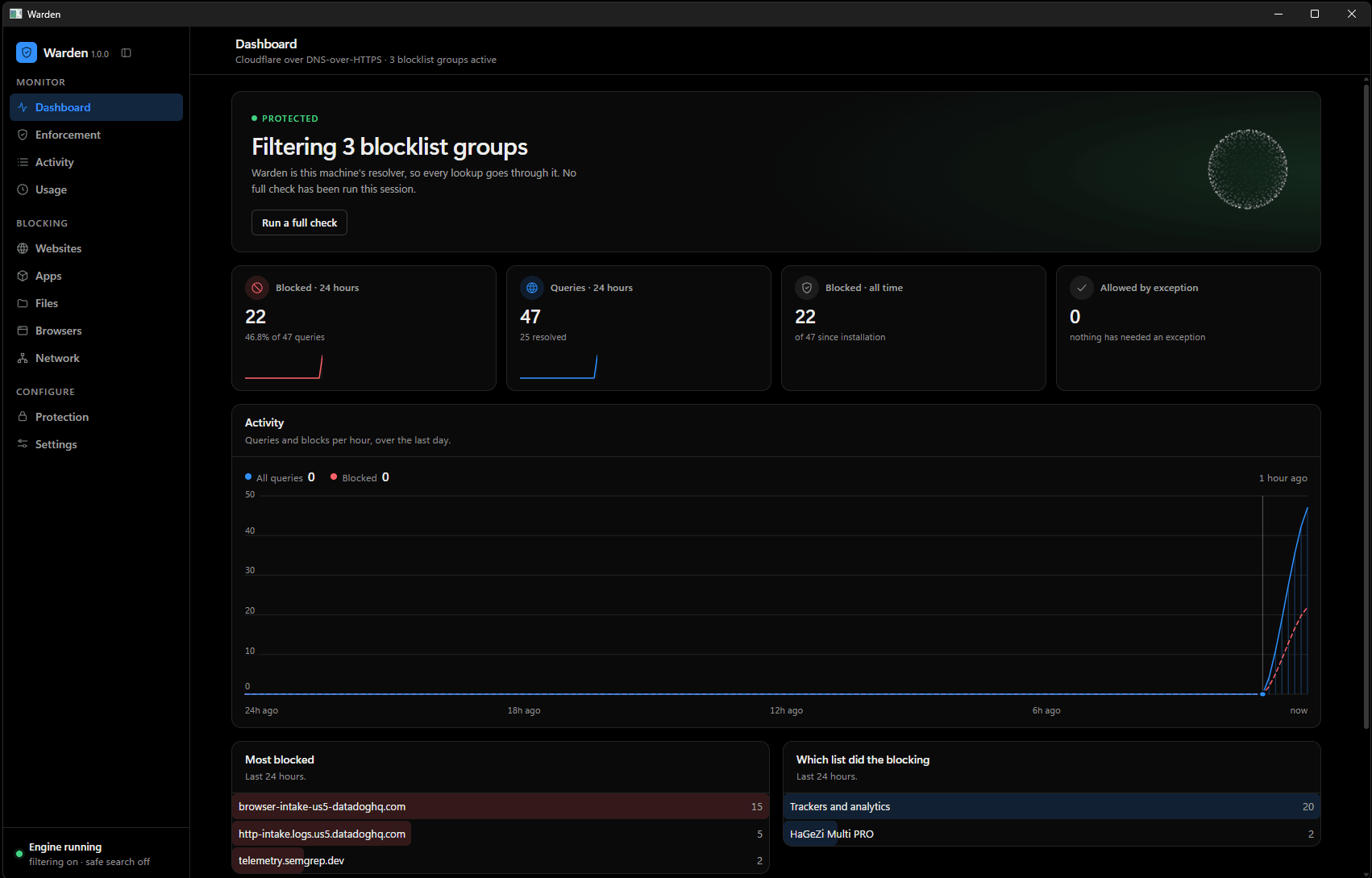
Warden's dashboard. A banner reads PROTECTED — filtering 3 blocklist groups, with a button to run a full check. Four counters follow: 22 blocked in 24 hours, 47 queries, 22 blocked all time, and 0 allowed by exception. Below them an activity chart plots queries and blocks per hour across the last day, then two tables: the most blocked domains, and which list did the blocking.
Warden 1.0.0 — this machine, filtering
  • 01

    Enforcement, measured

    Every protection is checked against the machine, not read back out of the settings file — so on means it is actually happening. Anything switched on and doing nothing is listed with the reason and the fix.

  • 02

    A block that explains itself

    When a site is blocked, a small panel says which one and why. Limited to the categories worth interrupting somebody for, and never for the dozens of ad lookups a single page makes.

  • 03

    Activity, and time

    What was asked for, and — separately, and only if you turn it on — how long each application was actually in front of you, with idle time excluded. The two are collected differently and are labelled as what they are.


05

What it does not claim

Every line above is something Warden holds. These four are the edges — where it stops, and what it will not pretend to do.

  • It is not administrator-proof

    Most of what is here is friction: an administrator with enough determination can take the permissions back. The documentation says which parts, and where the escape hatches are, rather than letting somebody find out at the worst moment.

  • It does not read your traffic by default

    The HTTPS content filter is off, and in an ordinary build the code that could do it is not compiled in at all. It is absent, not merely disabled.

  • It sends nothing home

    No telemetry, no accounts, no dashboards elsewhere. Blocklists are downloaded from their publishers into a cache on the machine; your queries go to the upstream resolver you picked; the query log and the usage record stay on the machine and can be turned off.

  • It cannot filter what it cannot see

    A browser that ignores policy, or traffic over a VPN the machine dials out itself, is outside what a resolver can reach. That is the reason layers 03 and 04 exist — and where a gap remains, the screen says so instead of showing a green tick.


06

The beta

Warden works and it is on other people's machines, but it is not a public release. What that buys you is a say in what it becomes. What it costs you is the rough edges below, stated here rather than discovered.

What is still rough

  • 01Windows 10 and 11 only. There is no macOS or Linux build and no date for one.
  • 02The layers that use browser policy and the firewall need administrator rights. Warden names which ones before it asks, and applies nothing it did not name.
  • 03Every lock is reversible, including mid-beta: the DNS and policy settings Warden replaced are snapshotted first and put back when a layer is turned off.
Platform
Windows 10 & 11
Runs as
Windows service
Licence model
one-time, offline
Account
none

Blocklists

blocklistproject · UT1 Toulouse (CC BY-SA 4.0) · HaGeZi

Next

BlockNSFW

adult content blocker